
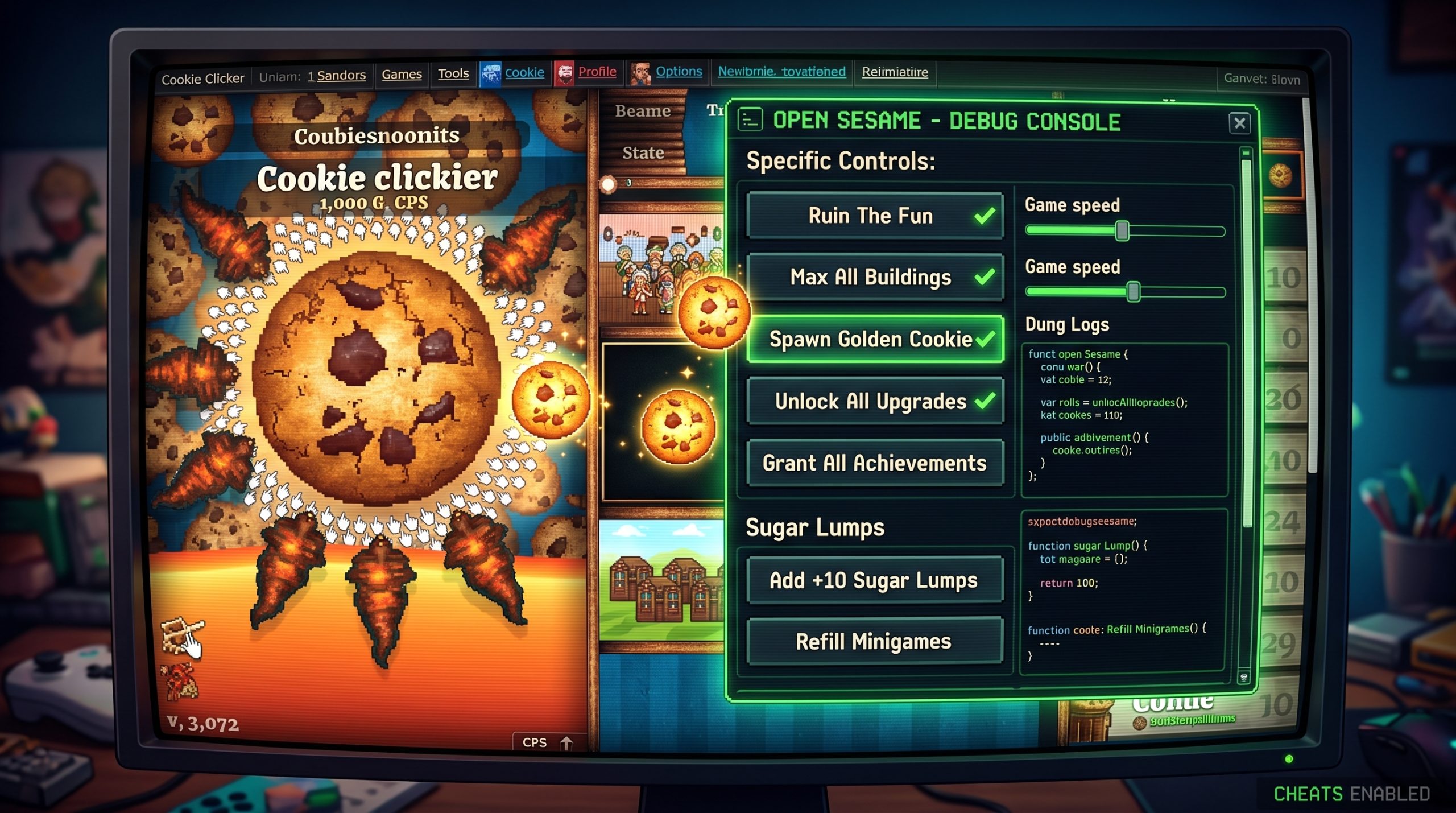
Open Sesame Cookie Clicker: How to Enable, Use, and Turn Off the Debug Menu
The Open Sesame Cookie Clicker debug panel is the closest thing the game has to a full developer toolkit. Once you know how to open it, you get one-click access to unlimited cookies, instant achievements, debug upgrades, and golden cookie spawns. Whether you’re tired of grinding or just curious about what’s running under the hood, this guide walks you through every method that actually works, including the one most articles skip: how to get it running on Steam.
What Is Open Sesame in Cookie Clicker?
Open Sesame is Cookie Clicker’s built-in debug control panel. It’s a secret interface that gives you direct control over almost every aspect of the game. Think of it as the developer’s own testing menu, left accessible to players who know the trick.
When you open it, you get a panel full of clickable buttons: multiply your cookies by 10, spawn any type of golden cookie on demand, unlock every upgrade at once, or completely wipe your save. The panel also unlocks 13 debug upgrades in your Stats menu, ranging from infinite golden cookie spawns to garden plants that grow every second.
Back Up Your Save Before Doing Anything Opening Open Sesame automatically awards you the “Cheated cookies taste awful” shadow achievement, even if you never click a single command. On Steam, this syncs to your Steam achievement list. Export your save string from the Settings menu before you proceed. You can remove the achievement afterward using the Neuromancy debug upgrade, but only after you have already opened the panel.
Two Ways to Open the Debug Panel
There are two methods to activate Open Sesame, and they behave differently depending on whether you are playing in a browser or on Steam.
| Method | Works on Browser | Works on Steam | Skill Required | Risk |
| Bakery rename (saysopensesame) | Yes | No | None | Low |
| Console command (Game.OpenSesame()) | Yes | Yes* | Basic | Low |
| Edit start.js (DEV=0 to DEV=1) | No | Yes (Steam only) | Moderate | Medium |
Steam console requires enabling developer mode first. That process is covered in the Steam section below.
Method 1: Rename Your Bakery (Browser Only)
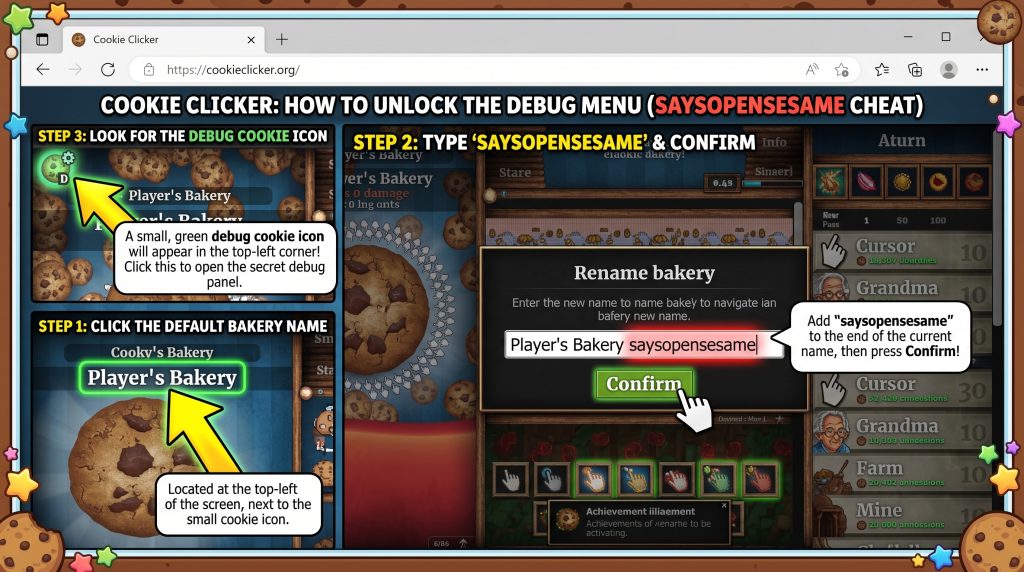
Click your bakery’s name in the top-left corner of the game. Add saysopensesame to the end of it with no spaces before it and no quotes around it. If your bakery is called “Sugar Palace,” it becomes “Sugar Palacesaysopensesame.” Hit Confirm.
If it worked, a small green cookie icon with a framerate counter appears in the top-left corner. Click it to open the panel. Keep the name in place while you are using debug mode. Changing your name back closes the panel on the next reload, but the shadow achievement stays regardless.
One thing to watch: If your bakery name is already long, adding “saysopensesame” may push it past the character limit and cut off the end of the phrase. The game reads the full string to verify it, so a partial phrase does nothing. Shorten your bakery name first if this happens.
Method 2: Browser Console Command
Right-click anywhere on the Cookie Clicker game window and select Inspect from the menu. In the panel that opens, click the Console tab. Type Game.OpenSesame(); and press Enter. The debug panel opens immediately.
This method works on the browser version without any name change, and it is faster if you only need the panel for a single session. It also works on the Steam version, but only after you have enabled the developer console in Steam first. That process is covered in the next section.
How to Enable Open Sesame on Steam (Different Steps)
The bakery rename trick does not work on the Steam version of Cookie Clicker. Valve’s build disables that path. To get the debug panel on Steam, you need to edit a single line in the game files.
Right-click Cookie Clicker in your Steam library and choose Browse local files. Open the resources folder, then app, and find a file called start.js. Open it in any text editor, Notepad works fine. Look for this line:
let DEV=0;
Change the 0 to 1, save the file, and restart Cookie Clicker through Steam. The developer console now appears automatically. From there, type Game.OpenSesame(); to open the debug panel.

Steam Achievement Warning Running Cookie Clicker with DEV=1 active disables Steam achievements for that session. Any achievements you earn while dev mode is on will not register. Change DEV back to 0 in start.js and restart the game when you are done testing.
Every Open Sesame Cheat Command Explained
| Command | What It Does | Notes |
| x10 / /10 | Multiplies or divides your cookies by 10 | Affects your bank count only, not CpS |
| x1k / /1k | Multiplies or divides your cookies by 1,000 | |
| +10 lumps | Adds 10 Sugar Lumps | |
| All upgrades | Unlocks every upgrade instantly | Includes seasonal and hidden upgrades |
| All achievs | Grants every achievement | Syncs to Steam on the Steam version |
| Ruin the Fun | Unlocks everything and adds 1 nonillion cookies | Hard to undo. Read the reversal section first |
| Wipe | Erases all progress and starts a fresh game | Permanent with no undo |
| Buy 100 of all | Buys 100 of each unlocked building | Only works if you have enough cookies |
| Frenzy / Elder frenzy | Spawns a golden cookie triggering that buff | Useful for testing buff stacking |
| HC x1k | Multiplies Heavenly Chips by 1,000 | Affects prestige upgrades |
| Ascend | Triggers ascension immediately | |
| All debugs | Unlocks all 13 debug upgrades | Includes Magic Shenanigans which multiplies CpS by 1,000 |
| Re-seed | Changes the seed for random events | Useful for garden optimization |
| Max heralds | Sets your Herald count to 100 |
How to Turn Off Open Sesame (And Undo the Damage)
Turning off Open Sesame on the browser version is simple. Click your bakery name, remove “saysopensesame” from the end, save your game, and reload the page. The panel disappears. If you want to remove the shadow achievement before closing, open the Stats menu, find “Cheated cookies taste awful” under upgrades, and toggle it off using the Neuromancy debug upgrade before you do the final reload.
On Steam, change DEV back to 0 in start.js, save the file, and restart Cookie Clicker. The developer console disappears and achievement tracking resumes normally.
If you used “Ruin the Fun” and want your original progression back, you cannot fully reverse it. Your best option is importing a save you backed up before opening the panel. If you did not back up, starting a fresh game is the cleanest path. Use the “Wipe” button from within the panel itself.
Why It’s Called “Open Sesame” The Phrase Behind the Panel
The phrase comes from the story of Ali Baba and the Forty Thieves, one of the tales in One Thousand and One Nights, introduced to Western readers by French translator Antoine Galland between 1704 and 1717. In the story, Ali Baba overhears thieves using the magic phrase iftah yā simsim, Arabic for “open, O sesame,” to unseal a cave packed with treasure. The phrase entered English by 1814 and has meant the same thing ever since: a secret key that opens something hidden.
Cookie Clicker’s developer Orteil named the debug panel after exactly that idea. The bakery rename command “saysopensesame” is a direct play on those magic words. You are telling the game to open its treasure cave, and it does.
Frequently Asked Questions
What is Open Sesame in Cookie Clicker?
Open Sesame is Cookie Clicker’s debug control panel, a hidden menu that lets players spawn golden cookies, multiply their cookies, unlock all upgrades and achievements instantly, and toggle debug upgrades that dramatically change how the game plays.
How do I enable Open Sesame in Cookie Clicker?
On the browser version, add saysopensesame to the end of your bakery name and click Confirm. A green cookie icon appears and clicking it opens the panel. You can also open your browser console by right-clicking, selecting Inspect, going to the Console tab, and typing Game.OpenSesame();.
Does Open Sesame work on the Steam version?
Not via the bakery rename method. On Steam you need to edit the start.js game file, change let DEV=0; to let DEV=1;, and restart. After that, use the developer console to run Game.OpenSesame();.
What does “saysopensesame” do?
Adding “saysopensesame” to your bakery name on the browser version activates Cookie Clicker’s debug mode and unlocks the full Open Sesame control panel. It has no effect on the Steam version.
What is the “Cheated cookies taste awful” achievement?
It is a shadow achievement that gets awarded the moment you open the Open Sesame panel, even if you close it right away without using anything. On Steam it registers to your Steam achievement list. You can remove it afterward by using the Neuromancy debug upgrade to toggle it off in the Stats menu.
How do I turn off Open Sesame?
On the browser version, remove “saysopensesame” from your bakery name, save the game, and reload the page. On Steam, change DEV back to 0 in start.js and restart. Achievement tracking resumes normally after the restart.
What does “Ruin the Fun” do in Cookie Clicker?
Ruin the Fun unlocks every upgrade, every achievement, and every building in the game, then drops one nonillion cookies into your bank. It is the most extreme cheat in the panel and you cannot reverse it without restoring a previous save.
Where does the phrase “open sesame” come from?
It comes from Ali Baba and the Forty Thieves, part of One Thousand and One Nights, translated into French by Antoine Galland between 1704 and 1717. The Arabic original is iftah yā simsim, meaning “open, O sesame.” The phrase entered English by 1814 and has described a secret key to something hidden ever since.
Will using Open Sesame disable Steam achievements?
Yes. When DEV mode is active on Steam, achievements do not register. Change DEV back to 0 in start.js and restart to re-enable normal tracking. Achievements earned during dev mode will not show up retroactively.
What is the difference between Open Sesame and the browser console?
Open Sesame is a pre-built panel of clickable buttons for the most common cheat commands. The browser console lets you type any command manually. That gives you more precision, for example setting your cookies to an exact number with Game.cookies=1000000; instead of multiplying by a fixed amount.
Final Thoughts
Open Sesame is powerful enough to break a run you have spent hours building, so back up your save before you touch anything. That is the one step you cannot skip. Everything else in this guide is reversible. That part is not.
If you want to start small, x10 is your safest first move. If you want the full experience, hit Ruin the Fun and see what one nonillion cookies looks like on screen.
About The Author

Hey, I’m Jody! I’m a web developer by profession and a passionate gamer from heart. Over the years, I’ve combined these two worlds by creating custom mods of mini web based games and tools to assist in those game so game's community members can enjoy enhanced user experience. Cookie Clicker Unblocked is also one of such project, created out of my love for the Cookie Clicker game.
I’ve released 7 versions to date, built dedicated cookie calculating tool, and even published a detailed guide to help players navigate the game like a pro. Let’s make gaming even more fun together!
- Jody Pressman

- Jody Pressman
- Jody Pressman
- Jody Pressman
- Jody Pressman
- Jody Pressman
- Jody Pressman
- Jody Pressman
- Jody Pressman
- Jody Pressman
- Jody Pressman
- Jody Pressman