

Is Cookie Clicker Unblocked Safe to Play? What’s Actually Running Behind the Game
Cookie Clicker pulls millions into its one-more-click loop, and unblocked versions let you play it past school and office filters. The fair worry is less about the game and more about what you are actually loading when you click.
TL;DR
- The game is safe for normal play: it runs as JavaScript and HTML in your browser with no download, install, or account, so nothing can infect your device and no password can leak.
- Your progress saves to your browser’s local storage, not a server account.
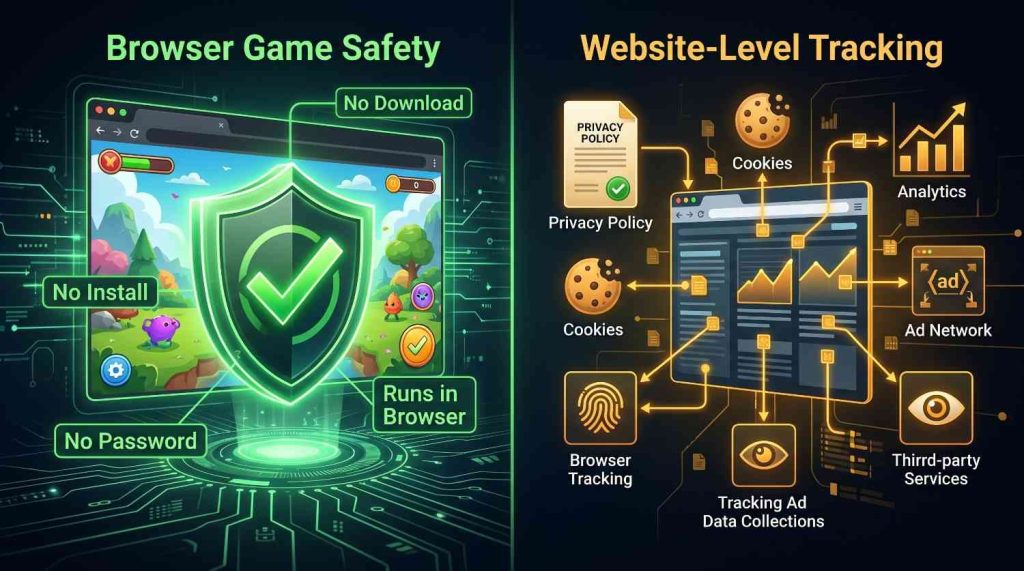
- “Safe” depends on the website, not the game code. Most free game sites set cookies and serve ads; the privacy policy confirms what a site loads.
- The real risk with unblocked games is third-party cheats, mods, and “infinite cookies” tools that ask you to install something.
- Guardrail: playing on a school or work network can break its acceptable-use policy even when the game is harmless.
Yes, Cookie Clicker Unblocked is safe to play in the way most people mean it. The game runs entirely in your browser, needs no download or account, and cannot install anything on your device by itself.
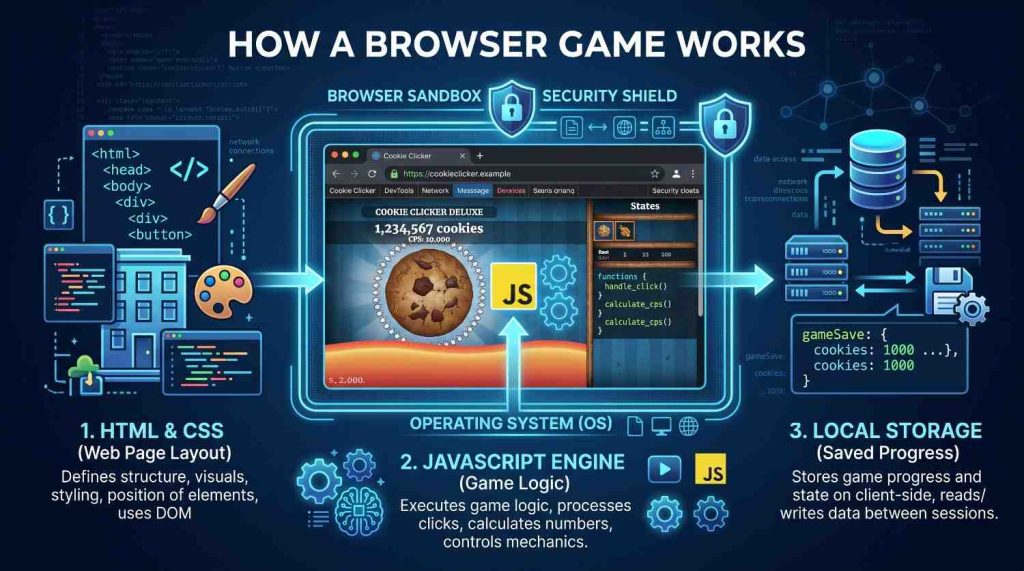
The game behind every unblocked version is the same browser-based idle game Julien “Orteil” Thiennot released in 2013 (the original is here). It is built in JavaScript and HTML, so it loads in a sandboxed tab like any web page, with no separate program to run.
So safety is really about the website, not the game code. The ads, cookies, and scripts a site loads around it are where the trade-offs sit.
What Is Actually Running in Your Browser When You Play?
Three things load: the game’s layout, its JavaScript logic, and a small save file in your browser. Nothing writes to your operating system, and no installer runs.
The save lives in your browser’s local storage on your device. The game creates no username or password, so there is no account that could be breached. On cookieclickerunblocked.io the game runs client-side and auto-saves locally about once a minute, with no login required.
Does Cookie Clicker Unblocked Contain Viruses or Malware?
No, the game code cannot infect your device on its own. Browsers run web games in a sandbox that blocks software installs and file access.
Malware comes through downloads, so if a site tells you to install a launcher, extension, or desktop version to play, close the tab. A clean version never needs that. Security guides on unblocked games agree: stick to a site you trust.
Does the Site Track You or Show Ads?
The game area shows no ads, but the page hosting it can load advertising and analytics code, like most free sites do.
The way to know is the privacy policy, since that is where a site discloses ads and cookies. Cookie Clicker Unblocked’s policy says it uses cookies, may show third-party ads, and uses Google AdSense. So the honest picture is a clean playing area on a website that can set cookies and serve ads you control through your browser and Google Ad Settings. That does not make a site unsafe, just normal, so trust the privacy policy over a homepage slogan.
How to Check What a Site Is Really Running
Open developer tools, click the Network tab, and reload to see which ad or analytics domains load. The privacy policy also lists cookies and ads, and a content blocker will count trackers.
Is It Safe to Play Cookie Clicker Unblocked at School or Work?
The game will not harm a school or work device, but the network can still see you visited. These networks often log activity and use filters like GoGuardian or Securly.
An unblocked site gets past a content filter, but it does not hide your traffic from monitoring or override an acceptable-use policy you agreed to. Cookie Clicker Unblocked loads on restricted networks without a VPN, but if gaming is banned there, play on your own connection.
Are Cheats, Mods, and “Infinite Cookies” Hacks Safe to Use?
This is where most real risk sits. Console cheats are usually harmless, but downloadable mods, save editors, and “free infinite cookies” extensions are a common path for malware.
Keep everything inside the game instead. Use the in-game Export Save option to copy your progress as text and store it yourself. For an easier run, cookieclickerunblocked.io has an in-browser Unlimited Cookies mode and an auto clicker in the same sandbox, with no install.
Is Cookie Clicker Unblocked Safe for Kids?
The gameplay is family-friendly, with no violence, chat, or contact with strangers. The part to supervise is the website, not the game.
If a host serves third-party ads, a child could tap one that leads elsewhere, so an ad blocker helps on family devices. A time limit is fair too, since idle games are built to be habit-forming.
Is Playing the Unblocked or Fan Version Legal?
Playing a free browser version is legal for you as a player. You distribute nothing, and clicking a cookie breaks no law.
The grayer area is on the site’s side, since most unblocked builds are fan-made clones of the original. Cookie Clicker Unblocked states it does not infringe the owner’s copyrights, which is the operator’s position, not a ruling. This is general information, not legal advice.
Frequently Asked Questions
Can Cookie Clicker Unblocked give my computer a virus?
The game code cannot infect your computer on its own, because browsers sandbox web games and block installs. Risk only appears if a site tells you to download a launcher or extension, so close any site that does.
Do I need to download anything to play Cookie Clicker Unblocked?
No. The game is built in JavaScript and HTML and runs in your browser on Windows, Mac, Linux, Android, and iOS, so any prompt to install a plugin, app, or VPN to play is a warning sign.
Does Cookie Clicker Unblocked save my progress, and where?
It saves to your browser’s local storage on your own device, not a remote account, so no login is needed. Clearing your browser data erases the save, so use the in-game Export Save option to keep a backup.
Will my school or work see that I played Cookie Clicker?
Possibly, because school and office networks often log browsing even when the game is harmless, and an unblocked site does not hide that traffic. If gaming is restricted there, play on your own connection instead.
Is Cookie Clicker safe for children to play?
The gameplay is family-friendly, with no violence, chat, or contact between players. Supervise the website rather than the game, since ad-supported hosts can show outside links.
Does cookieclickerunblocked.io require an account or personal details to play?
No. The game runs without a login or profile and stores progress in your browser, so there are no credentials to leak, and personal details are only collected if you choose to send them.
What does cookieclickerunblocked.io do with my data when I play?
Playing creates a local save and needs no personal information. The site’s privacy policy describes using cookies and serving ads through Google AdSense, which is standard for free game sites.
About The Author

Hey, I’m Jody! I’m a web developer by profession and a passionate gamer from heart. Over the years, I’ve combined these two worlds by creating custom mods of mini web based games and tools to assist in those game so game's community members can enjoy enhanced user experience. Cookie Clicker Unblocked is also one of such project, created out of my love for the Cookie Clicker game.
I’ve released 7 versions to date, built dedicated cookie calculating tool, and even published a detailed guide to help players navigate the game like a pro. Let’s make gaming even more fun together!
- Jody Pressman

- Jody Pressman
- Jody Pressman
- Jody Pressman
- Jody Pressman
- Jody Pressman
- Jody Pressman
- Jody Pressman
- Jody Pressman
- Jody Pressman
- Jody Pressman
- Jody Pressman